Every SaaS platform has a status page showing its uptime. Most also offer to notify you when something goes wrong. But a notification system is just more software - and it can fail too.
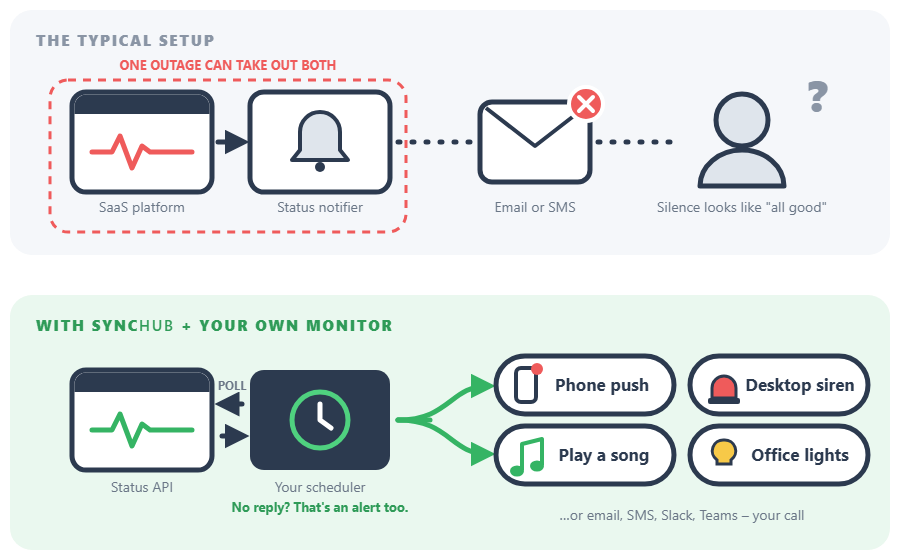
Our own System status page works differently. Instead of relying on our alerts, you poll our status from your own systems, and send alerts to your team however you like.
Who's monitoring the status monitor?
Status alerts usually come from the same platform that's having the problem, or from a third-party service that sits in the same chain. That leaves a few gaps:
- A major outage (say, a cloud region going down) can take out the platform and its notification service at the same time.
- Even when a third party runs the notifier, it's one more dependency that can break, get rate-limited or land in your spam folder.
- Worst of all, a missing alert looks exactly the same as "everything's fine".
Separate the status from the alerts
Our status is available through our AI & Automation API, so your own systems check it on a schedule and raise the alarm. Two endpoints do the work:
Status/GetStatusreturns our known incidents, the same ones shown on our status page. PassmodifiedAfterto pick up only what's new since your last check.Mirror/GetOverdueSyncsreturns any of your endpoints whose scheduled sync is running late. This one is specific to your data, so it can spot a delay before we've even posted an incident.
Run them from whatever you already trust: a cron job, a serverless function, Power Automate, n8n or a few lines of AI-written code. And because you make the call, you also know when it fails. No reply from us is an alert in its own right, which no email-based notifier can give you.
The API documentation walks you through it step by step.
Alerts people actually notice
Once the alert lives in your own ecosystem, you're not limited to an email or an SMS. Send it wherever it'll get noticed:
- A push notification on your phone
- Flash your Windows desktop and play a siren
- Play a particular song on Spotify
- Make the smart lights in your office flash red
- Or simply post to the Slack or Teams channel your team already watches
Your alerts, your rules
Your reports depend on fresh data, so you need to know the moment it's at risk. With SYNCHUB, you don't have to trust our notifications. Check our status from your own systems, and alert your team in whatever way works for them.