Your custom database is often the beating heart of your business - your line-of-business app, your legacy ERP, or that bespoke system someone built (or, increasingly, vibe-coded) a few years ago. It holds some of your most valuable data.
But the moment someone asks for a Power BI dashboard, a Tableau report or an AI agent that can "just query the database", you're faced with a tough choice: open up your production system to third parties, or say no.
In this article, we'll look at why reporting directly from production is a bad idea, and how our Custom Database Connector gives you a safer alternative.
Sync a copy, not a connection
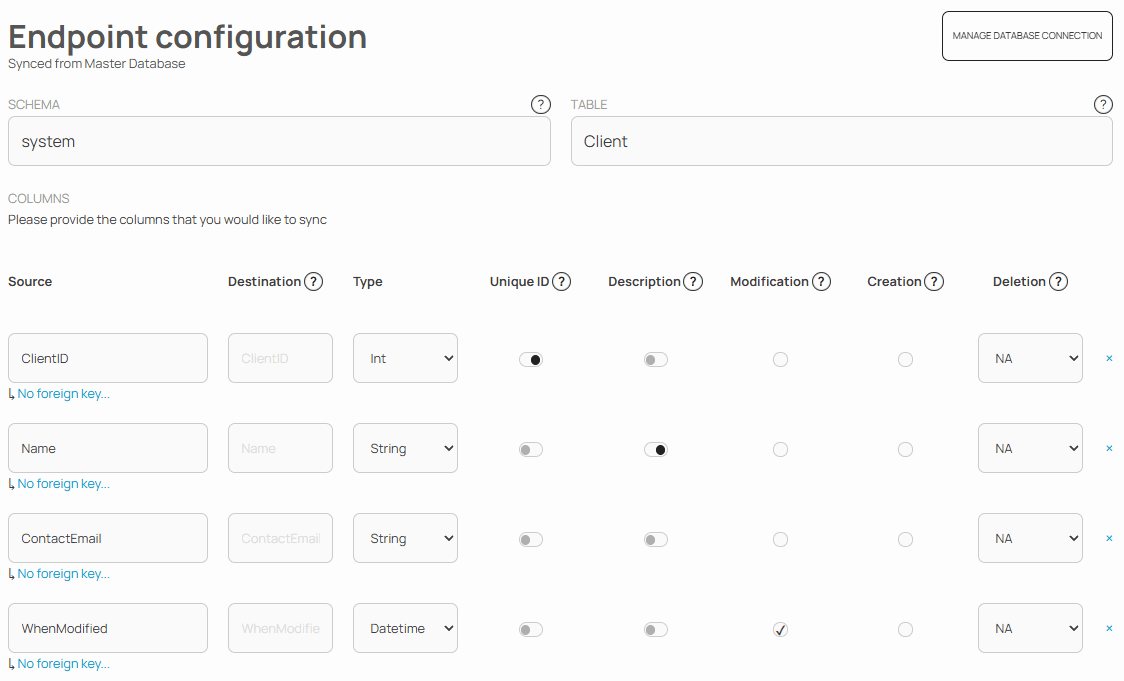
SYNCHUB syncs a copy of your data into a reportable, AI-friendly database, so downstream tools never touch production. Our configurator lets you specify the individual tables and columns that you'd like to sync.
Syncing your data
Our table sync works the same as our regular endpoint sync - searching for modified records. Note in the screenshot above that the user has indicated which column (WhenModified)
represents the modification-timestamp of this table. We'll query your data based on this column, looking for records changed since the prior time we synced data.
If you don't have a modification filter on your table, we'll sync that too - but it means getting every record every time you sync, and is therefore vastly inefficient for anything but the most trivial of payloads.
Report from the tools you already use
Use your favourite reporting tools or AI chatbots or agents to query your data.
Combine it with the rest of your business
Once synced, your custom data sits alongside your cloud service data, so you can query across your entire business.
AI-enable your legacy systems
Ask questions in plain English via our AI Assistant, or plug your data into existing agentic workflows with our Universal MCP Connector - without handing an AI agent the keys to production.
Remember, there is more to AI than just an MCP wrapper you tack around your existing application. By instead bringing your data into the SYNCHUB ecosystem, your data will automatically benefit from our additional AI-context engineering, tooling and prompts.
Frequently asked questions
Get started
For more details about our connector, see our documentation.