Using Insights to take historical snapshots of your Ruddr data
A common limitation of 3rd-party APIs is that they serve only “current” data. But what if you want to retain the history of your data as it changes over time?
Part of our Ruddr blog series
In this article, I’ll demonstrate how you can use a simple Insight to record an audit trail of any of your endpoints.
The problem
For this example, we're going to use data from the table in our Ruddr connector. Extracting data from this table is pretty simple...
select
from
The problem is that this data is in a relational database. If a change is made to any of these records, your prior value - by design - is overwritten because relational databases prefer to have a single current copy of your records:
What you really need is a snapshot of your records as they change over time, so that you can reference items as they were at any arbitrary point in the past.
Unfortunately, Ruddr doesn't record historical data like this. But fortunately for you, SyncHub does.
The solution
SyncHub lets you easily resolve this problem by creating an Insight which detects changes to your data and records them in a timestamped table that you can reference in your reports.
The solution consists of two parts - a self-referencing Insight which searches for changes, and a Parameter which caches your data, ensuring excellent performance for your Insight. Let’s start with the Parameter itself, as it is the easiest. Copy this SQL into your Query Editor (I have documented the code inline, so read it carefully):
-- Create a temp table to store the latest value of each record
declare @Keys table (
    SnapshotKey nvarchar(50)
)

-- Include all existing snapshots by querying the existing records from your Insight
-- Remember, your Insight may not have been created yet, so you need to check
-- if the table exists first.  You can call your table whatever you like, but make a note of it
-- as you'll be using it in your other Insight later too. In this case,
-- I have chosen to call it 'ruddr__snapshot'
if exists (select 1 from information_schema.tables where table_schema='sh_report_cache' and table_name='ruddr__snapshot')
begin
    insert into @Keys
    select distinct SnapshotKey from sh_report_cache.ruddr__snapshot
end

-- We also add a "current" key, which our calling function uses to populate the current snapshot
-- The snapshot key is simply a representation of the date time, in an *orderable* format, which means yyyyMMddHHmmss
-- It must be orderable because get the LATEST version from our snapshot table. It also must be a string, because we have to account
-- for the '0' placeholders here and there
declare @SnapshotKey nvarchar(50) = FORMAT(GETUTCDATE(), 'yyyyMMddHHmmss')
insert into @Keys values (@SnapshotKey)

-- Return our list
select * from @Keys
So far so good. Now, you need to make it a Parameter, so that we can use it in our other Insight:
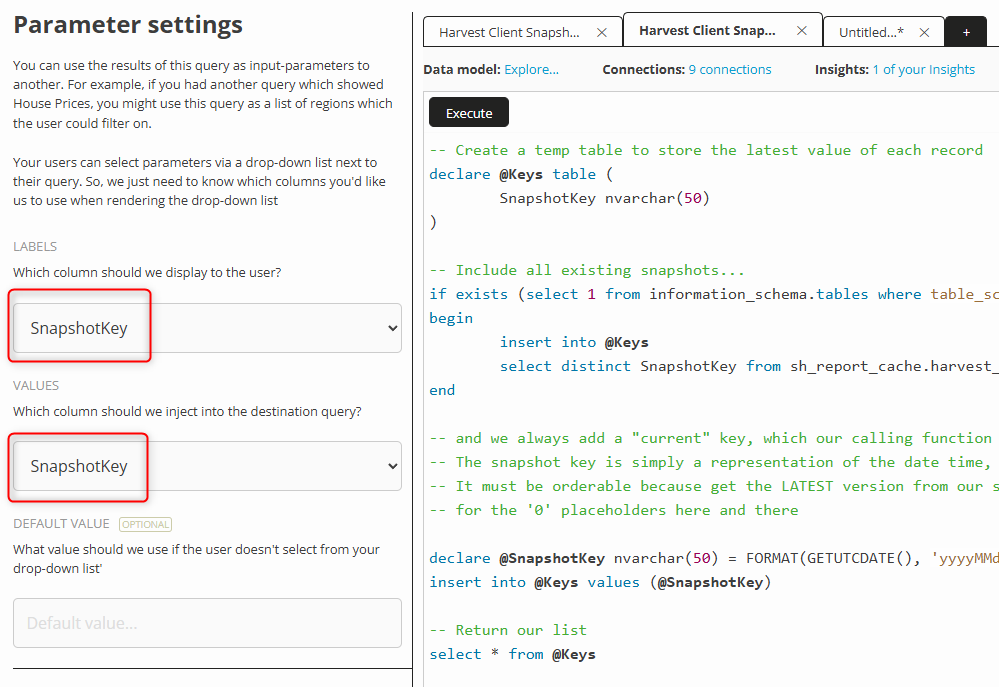
Great. Now, create a second file in your Query Editor and pop in the following SQL:
-- By pulling the key from our parameters, we enable Insights to cache
-- Note that my parameter name (ruddr__snapshot) may differ from the one you created in the earlier step
declare @SnapshotKey nvarchar(50)
set @SnapshotKey = '[PARAMETERS.ruddr__snapshot]'

-- Create a temp table to store the latest value of each record
-- The columns here must match what you eventually want to snapshot for your  data
declare @MostRecentSnapshot table (
    RemoteID nvarchar(200), -- Always grab the RemoteID - we use this later to detect changes
)

-- Load our latest snapshots? Remember, our Insight may not exist yet, so we need to check
-- first.  And note that the table name must match that in your prior Parameter query
if exists (select 1 from information_schema.tables where table_schema='sh_report_cache' and table_name='ruddr__snapshot')
begin
    ;with latest_records as (
        select RemoteID, max(SnapshotKey) as LatestSnapshotKey
        from sh_report_cache.ruddr__snapshot
        group by RemoteID
    )
    insert into @MostRecentSnapshot
    select s.RemoteID, , s.SnapshotKey
    from sh_report_cache.harvest_client_snapshot s
    inner join latest_records l on (s.RemoteID = l.RemoteID and s.SnapshotKey = l.LatestSnapshotKey)
end

-- Now just select the records that are in your current realtime table, but whose data differs from that in the snapshot table
select
    c.RemoteID, , @SnapshotKey as SnapshotKey
from [CONNECTIONS.ruddr]. c

-- Compare to their latest snapshot?
left join @MostRecentSnapshot snapshot on (c.RemoteID = snapshot.RemoteID)

-- Get records where either the snapshot is different, or there is no prior snapshot
where (
    snapshot.RemoteID is null
    or (
        c.Name <> snapshot.Name
    )
)
And that’s it for the SQL - not too bad, right? Next, you just need to create an Insight from this second query:
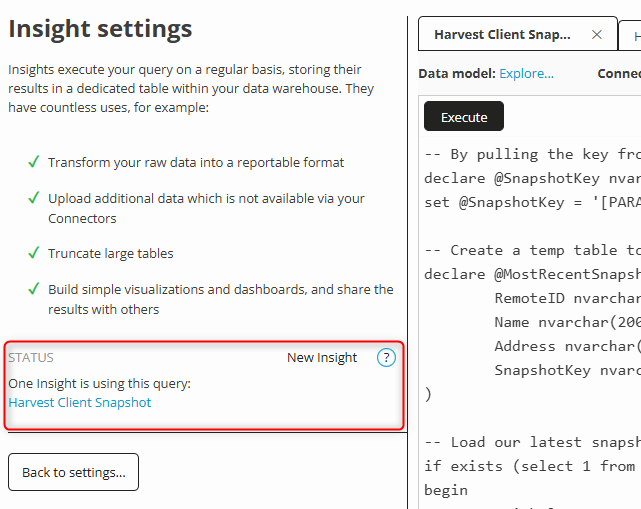
Important - set your parameter cache
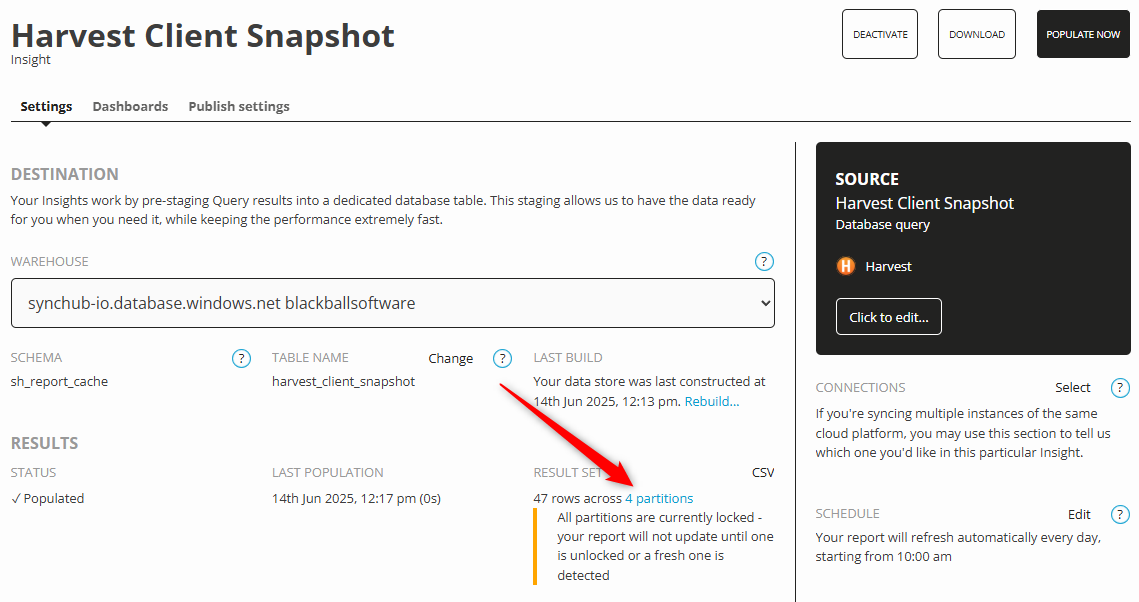
Open the newly created Insight and observe its settings. It is crucial that you configure your Insight to cache your prior records, otherwise it will just continuously overwrite your snapshots with the latest data. To do this, select the Partitions section from your Insight…
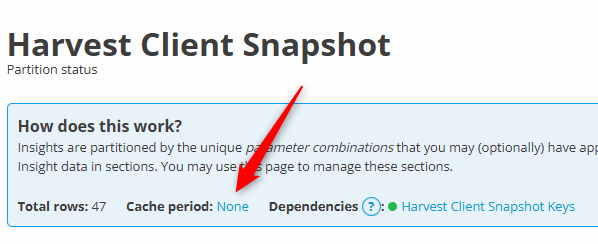
And set your cache set zero, which means “immediate”:
Let’s see it in action…
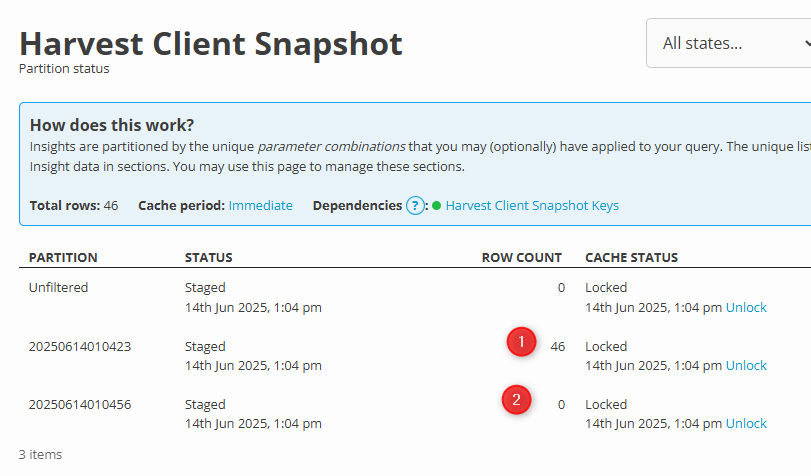
Here is my Insight after it has run for the first couple of times. You can see that the first time (1) it took all of my records, but the second time it ran (2) it took no records at all, because no changes were made to the data in the interim:
Daaaaamn…! That’s cool.