To the best of our knowledge, SYNCHUB was the first data-extraction platform to offer a Universal MCP Connector, allowing our customers to integrate their business data directly into their AI chats and agentic workflows. Since its release, we have iterated constantly on the architecture to scale up performance & features, and quite honestly, we're really proud of the work that's gone into it, and the power it brings to our customers.
In this article, I'm going to reveal the technology & architecture behind our MCP connector, as well as some of the challenges we have had to overcome to support a system that can intelligently query across 70+ cloud services.
Configuring your own MCP server
The first thing you need - obviously - is an actual server and app to build this protocol on. We used our existing API (which is built using C# and .Net) so that's what our examples below will be shown in.
The Model Context Protocol is a standardised set of rules which allow AI agents (like Claude, ChatGPT etc) to programmatically converse with third-party software services. Most typically, these software services are applications that either process data from the AI, or generate data for the AI to use. Our own Universal MCP Connector falls into this latter category.
The MCP protocol is covered on the official MCP website, so before we can provide any functionality, we have to first of all implement some scaffolding which MCP expects.
The protocol requires a few endpoints with convention-based URLs, so we built out the following:
/.well-known/oauth-protected-resource/mcp
This endpoint is fairly simple, returning only the link to the authentication endpoint (below)
[HttpGet("~/.well-known/oauth-protected-resource/mcp")]
public async Task<IActionResult> MetaDataDiscoveryMCPServer()
{
    // The base server resolves to our API - https://api.synchub.io
    var baseApiUrl = Library.Config<string>("ApiBaseUrl").StripEnd("/");

    var disc = new OpenIDProtectedResourceMetadataDiscovery() {
        // Route must end with the same path as our mcp controller route
        resource = $"{baseApiUrl}/mcp",
        authorization_servers = new(){$"{baseApiUrl}"}
    }.ToJson(false);

    // NB: null values in response must not be serialized, so we actually re/double-encode it here
    return Json(disc.FromJson<object>(false));
}
/.well-known/oauth-authorization-server
This endpoint is a little more meaty, telling the MCP client where to look for things like app registration and user authentication.
[HttpGet("~/.well-known/oauth-authorization-server")]
public async Task<IActionResult> MetaDataDiscoveryAuthServer()
{
    // Resolve to https://app.synchub.io and https://api.synchub.io respectively
    var baseWebUrl = Library.Config<string>("ApplicationSiteUrl").StripEnd("/");
    var baseApiUrl = Library.Config<string>("ApiBaseUrl").StripEnd("/");

    // You need to provide default scopes so that when the OAuth request is initiated, the calling app will:
    // a) pass the scopes it requires, so your app can auto-select scopes for your user (if your registration supports this); and
    // b) understand what to expect in terms of user approval. For example, ChatGPT will raise a warning if the user deselects any of the scopes which we declare as important here
    var scopes = await Dependency.Resolve<IAppManager>().GetScopesForAutomaticallyRegisteredApps();
    var disc = new OpenIDDiscovery() {
        authorization_endpoint = $"{baseWebUrl}/foundation/views/app/connect",
        token_endpoint = $"{baseApiUrl}/authentication/token",
        issuer = $"{baseApiUrl}",
        scopes_supported =scopes.Select(x=> x.Key).ToList(),
        response_types_supported = ["code"],
        token_endpoint_auth_methods_supported = ["client_secret_basic", "client_secret_post" ,"none"],
        registration_endpoint = $"{baseApiUrl}/authentication/register",
        code_challenge_methods_supported = ["S256"], // This is for PKCE OAuth
        grant_types_supported = ["refresh_token", "authorization_code", ],
        }.ToJson(false);

    // Re/double encode to ensure null values in response are not serialized
    return Json(disc.FromJson<object>(false));
}
I'll show a little further on how we implement the registration and authentication endpoints, for now you just need to understand the format of this meta data that the protocol requires.
Self-registering an OAuth Client
Most of the cloud services that we connect to require OAuth2 so we're no strangers to the
protocol, but this was the first time we had encountered a system that
dynamically registers the client_id. Most typically, the client_id is provided by the caller and passed up with the authorization request, so how did we
support 100% anonymous authentication requests?
The answer lies in the registration_endpoint value provided in the meta-data above, which directs the client to our /authentication/register endpoint.
MCP clients use this to register a new set of OAuth credentials with which to later authenticate the user. The endpoint is fairly simple:
public async Task<IActionResult> Register(OAuthAppRegistrationRequest req)
{
    // We maintain a list of registered OAuth2 clients in our 'App Manager'. Here, we dynamically create a NEW
    // registration, which (most importantly) includes the provision of client_id/etc (used later in authorization)
    var appMgr = Dependency.Resolve<IAppManager>();
    var now = DateTime.UtcNow;
    var app = await appMgr.CreateApp(null, req.client_name, AppStates.Draft); // Draft state because it is adopted later
    var summary = "Dynamically created by initial connection process";
    var scopes = (await Dependency.Resolve<IAppManager>().GetScopesForAutomaticallyRegisteredApps())?.Select(x => x.Key).ToList();
    await appMgr.SaveApp(app.AppID, app.Name, summary, scopes, req.redirect_uris, app.IconDocumentGuid);

    // The secret is one-way encoded in our system, so this in-memory call is the only place it is ever exposed (so it can be returned to the client)
    var secretString = await appMgr.UpdateSecret(app.AppID);
    var res = new OAuthAppRegistrationResponse() {
        client_id = app.AuthClientID,
        client_name = app.Name,
        client_id_issued_at = now.ToUnixEpoch(),
        client_secret_expires_at = now.ToUnixEpoch() + 100_000_000_000,
        client_secret = secretString,
        grant_types = ["authorization_code", "refresh_token"],
        redirect_uris = req.redirect_uris,
        token_endpoint_auth_method = req.token_endpoint_auth_method,
        logo_uri = req.logo_uri,
        jwks_uri = req.jwks_uri,
    }.ToJson(false);

    return Json(res.FromJson<object>(false));
}
Authenticating the client using OAuth2
Now that the MCP client has its own unique set of credentials, it can use this to authenticate our user with our system.
Thankfully, the MCP spec supports the OAuth2 protocol to authorize connections, and this is what our own connection uses. The SYNCHUB app already uses this protocol to authorize our users, so it was mostly a case of piggy-backing on that existing architecture (we had to build out support for PKCE though).
First, the client redirects the user to the URL that we provided in the authorization_endpoint value above. Here, they can sign in to confirm
their identity and tell our system that it's okay to allow the MCP client to make requests for their data.
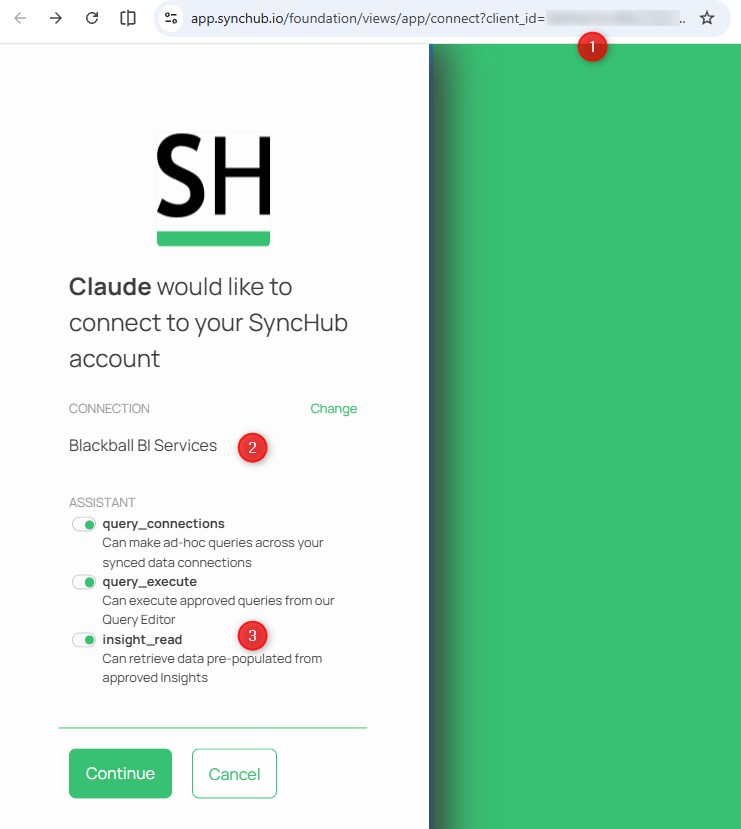
Note in particular:
- The
client_idvalue that was generated in via the/registerendpoint earlier - The user chooses what account they are connecting Claude to. This is a feature specific to SYNCHUB - your app will probably authorize at the user level
- The scopes are automatically selected according to the defaults that we provided in the earlier configuration, however the user is able to change these if they like
Ultimately, the user is redirected back to the MCP client (in this case, Claude):
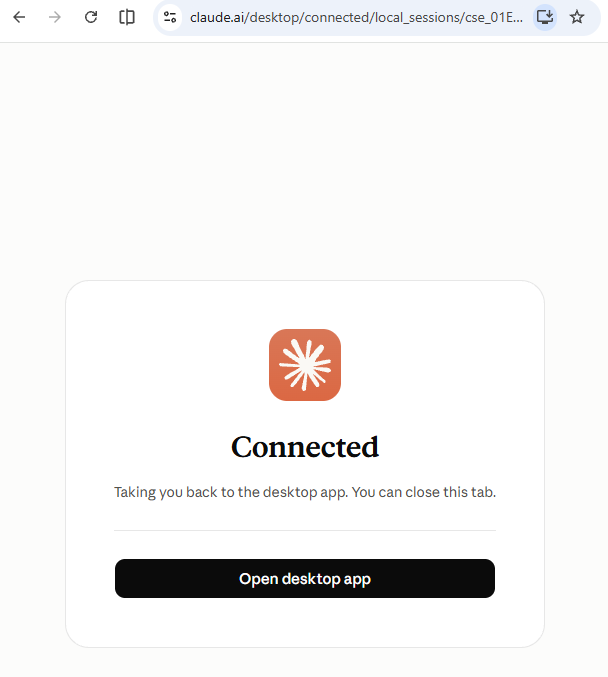
Exposing the MCP "tools" list
MCP operates around a concept of "tools" with each tool representing an endpoint within your MCP server that client apps can call. Once authorized, the first thing that the MCP client needs to know is what tools your new MCP offers, and for this it uses the tools/list request.
But before we demonstrate this, I want to show you how we build a more generic endpoint for handling MCP requests. You see, the tools/list request
is only one of many in the MCP standard, and each request has a different set of request parameters and response format expectations, while still retaining common
functionality like authentication. So, in the interests of keeping things DRY, we built this:
[HttpPost]
[Produces("text/event-stream")]
public async Task OnRequestReceived(MCPPost post)
{
    // It's a streaming event, which (amongst other things) allows your chatbot to write out answers as they are produced here
    this.Response.ContentType = "text/event-stream";

    // Preserve request for attachment to error response if something goes wrong before we
    // assemble a proper response
    var reqId = (post.Post as IJsonRpcRequest)?.id;

    try
    {
        // By the time this endpoint is called, our client has already generated a token via the OAuth2 protocol, so
        // we know the context/person that we're operating under
        // But, if this endpoint is called without authorization we must return 401 to let the client know
        // they need to go through the auth procedure
        if (!this.CurrentUser.IsAuthenticated)
        {
            var baseApiUrl = Library.Config<string>("ApiBaseUrl").StripEnd("/");
            var absoluteUrl = $"{baseApiUrl}/.well-known/oauth-protected-resource/mcp";
            this.Response.Headers.Add(new("WWW-Authenticate", absoluteUrl));
            this.Response.StatusCode = 401;
            return;
        }

        // MCP posts errors back to us, which is very handy. We capture/log them here
        if (post.Post is MCPErrorRequest errReq)
        {
            // We'll log then return acknowledgement of request
            var errorMessage = $"MCP failure notification for method '{errReq.method ?? "unknown"}', code {errReq.Error?.code ?? 0}";
            Dependency.Resolve<ISystemLogManager>().Log(errorMessage, errReq.Error?.message, SystemLogTypes.Error);
            await this.SendMCPResponse(new MCPErrorResponse(errReq));
            return;
        }

        // Get our session or create a new one
        // If we are given a session ID and that session does not exist we must return a 404 to properly alert the client
        // As of version 2026-07-28 MCP is stateless and no longer supports persistant sessions, however we maintain it for backwards-compat
        var sessionID = Request.Headers["Mcp-Session-Id"];
        if (sessionID != StringValues.Empty && !await this.SessionExists(sessionID))
        {
            this.Response.StatusCode = 404;
            return;
        }
        var session = await this.GetOrCreateSession(sessionID);

        // Initialize requests, as per /initialize call
        if (post.Post is InitializeRequest initReq)
        {
            Response.Headers.Add("Mcp-Session-Id", session.SessionId);
        }

        // Make sure we are supporting the MCP version
        if (post.Post is IMCPRequest imcpReq)
        {
            // Ensure protocol version match
            if (imcpReq.ProtocolVersion != null && !MCPManager.SupportedProtocolVersions.Contains(imcpReq.ProtocolVersion))
            {
                var ex = new UnsupportedProtocolVersionException() {
                    data = new {
                        supported = MCPManager.SupportedProtocolVersions, requested = imcpReq.ProtocolVersion
                    }
                };

                await this.SendMCPResponse(new MCPErrorResponse() {error = new JsonRpcError(ex)});
                return;
            }
        }

        // Finally, process specific requests
        var res = await this.HandleMCPRequest(post.Post, session);
        await this.SendMCPResponse(res);
    } catch (Exception ex) {
        var userEx = ex.ToUserException("Failed to handle MCP request");
        var res = new MCPErrorResponse();
        res.error = new JsonRpcError(new ServerException(userEx.Message));
        res.id = reqId;
        await this.SendMCPResponse(res);
    } finally {
        await this.CloseStream();
    }
}
With that scaffolding in place, HandleMCPRequest simply inspects the type of request (initialize, tools/list, tools/call etc) and
routes it to the appropriate handler in our MCPManager.
The tools/list response
Internally, our AI assistant is built around the concept of "actions" - small, self-describing C# classes which our own agents can call. Rather than maintain a separate set of MCP tools,
we simply re-use these same actions, and convert them into the MCP format using reflection. Each action exposes a UniqueKey (the tool name), a Purpose (the tool description)
and a strongly-typed trigger class whose properties become the tool's inputSchema:
public async Task<Tool> ConvertActionToMCPToolDescription(IConversationAction action)
{
    var tool = new Tool();
    tool.name = action.UniqueKey;
    tool.annotations.title = action.FriendlyName;
    tool.description = action.Purpose;

    // Every trigger property decorated with [AIActionProperty] becomes a tool parameter
    foreach (var prop in action.TriggerType.GetPropertiesWith<AIActionPropertyAttribute>())
    {
        tool.inputSchema.properties[prop.Name] = new() { type = GetJsonType(prop), description = prop.Description };
        tool.inputSchema.required.Add(prop.Name);
    }
    return tool;
}
The tools that are returned depend on the scopes the user approved when they connected, but a typical response looks like this (descriptions abbreviated for readability):
{
  "jsonrpc": "2.0",
  "id": 2,
  "result": {
    "tools": [
      {
        "name": "get_context",
        "annotations": { "title": "Get context" },
        "description": "Call this first to get a list of the user's connections, insights and custom queries...",
        "inputSchema": { "type": "object", "properties": { ... }, "required": [ ... ] }
      },
      {
        "name": "query_data",
        "annotations": { "title": "Query data" },
        "description": "Use this for SQL queries or questions about the data structure:\n- this tool can do aggregate reporting across multiple connections...\n- you must pass all the information I need to query the data as accurately as possible...\n- this tool requires at least one value for its APIConnectionIDs property...\n- if the query returns too many rows, this tool will first confirm with the user...",
        "inputSchema": {
          "type": "object",
          "properties": {
            "Question": {
              "type": "string",
              "description": "The question that I have asked of the data. This property must include all the information I need to query the data as accurately as possible, so make sure it includes context like connection names, relationships, expected output etc"
            },
            "APIConnectionIDs": {
              "type": "string",
              "description": "Comma seperated list of the APIConnectionIDs relevant to this question..."
            },
            "LocalTimeZone": {
              "type": "string",
              "description": "Your local time zone (in IANA format)"
            }
          },
          "required": ["Question", "APIConnectionIDs", "LocalTimeZone"]
        }
      },
      { "name": "query_insight", ... },
      { "name": "execute_custom_query", ... },
      { "name": "restore_omitted_data", ... }
    ]
  }
}
The star of the show is query_data. Notice what is not in its input schema: there are no table names, column names or SQL. The calling AI only needs to
pass a rich, natural-language Question and the IDs of the connections it relates to (which it obtained earlier from get_context). Everything else
is figured out on our side.
Calling the query_data tool
When the user asks something like "Who were my top 5 customers by revenue last quarter?", the MCP client decides that query_data is the right tool and sends
a tools/call request:
{
  "jsonrpc": "2.0",
  "id": 7,
  "method": "tools/call",
  "params": {
    "name": "query_data",
    "arguments": {
      "Question": "From the 'Acme Ltd' Xero connection, list the top 5 customers by total invoiced revenue (excluding tax) for last quarter (Jul-Sep 2026), including customer name and total.",
      "APIConnectionIDs": "1234",
      "LocalTimeZone": "Pacific/Auckland"
    },
    "_meta": { "progressToken": "abc123" }
  }
}
Our CallTool handler uses the same reflection in reverse - mapping the arguments back into a strongly-typed QueryDataTrigger - and then
injects a request for the QueryDataAction straight into a lightweight conversation. Because we construct the action request ourselves, the conversation
skips the usual "ask an AI what to do" step and goes straight to executing the action:
if (toolName == new QueryDataAction().UniqueKey)
{
    var trigger = ConvertCallToolRequestToActionTrigger<QueryDataTrigger>(req);
    var conversation = await BeginMCPConversation(session, trigger);

    // Construct a "fake" AI response which requests our QueryDataAction - this means
    // the conversation executes the action directly, without a round-trip to an AI model
    var actionRequest = new ActionRequest(new QueryDataAction().UniqueKey, trigger.ToJson());
    var conResponse = await conversation.ContinueWith(trigger.Question, actionRequest, progress);

    // Hand the action's result straight back to the MCP client
    var queryDataResult = conResponse.GetActionResult<QueryDataResult>();
    res.result.content.Add(new(queryDataResult.ToJson()));
}
Why route it through a conversation at all? Because it means MCP requests get exactly the same logging, auditing, progress reporting (note the progressToken)
and history as questions asked inside our own AI assistant - keeping it DRY, people!
Giving QueryDataAction the context it needs - on demand
To write accurate SQL, an AI needs to know the structure of every table it might touch: column names, data types, foreign keys, which columns are UTC, and so on. A single Xero connection has dozens of tables; a customer with a handful of connections, plus their own Insights or custom database, can easily have hundreds of tables and thousands of columns.
If we front-loaded all of that into the MCP client's context (e.g. in the tool description or the get_context result), we would:
- burn through the user's token budget on every single conversation - most of which only need two or three tables;
- degrade answer quality, as the model wades through pages of irrelevant schema; and
- quickly hit context window limits for our larger customers.
So instead, QueryDataAction spins up its own dedicated SQL agent (a GenerateSQLConversation), whose system prompt contains only a lightweight map of the data:
the connections in play, their purpose, and a list of tables/insights/queries available. The detailed structures are then
fetched on demand via tools that only this agent has access to:
public class GenerateSQLPrompt : BaseConversationPrompt
{
    public override List<IConversationAction> Actions
    {
        get
        {
            var acts = new List<IConversationAction>() {
                new ParseSQLAction(),          // parse_sql - how the agent hands its final SQL back to us
                new DescribeTableAction(),     // get_table_definitions - full column schemas, on demand
                new DescribeDataStoreAction()  // describe_data_store - drill into a connection's tables
            };
            if (this.CanQueryInsights) acts.Add(new DescribeInsightAction());
            if (this.CanExecuteCustomQueries) acts.Add(new GetCustomQuerySQLAction());
            return acts;
        }
    }
    ...
}
The agent is instructed to always call get_table_definitions before writing SQL (we found it would otherwise occasionally invent plausible-sounding columns).
It passes in only the IDs of the tables it actually needs - and follows foreign keys to pull in related tables as required:
public class DescribeTableAction : BaseConversationAction<DescribeTableTrigger, DescribeTableResult>
{
    public override string UniqueKey => "get_table_definitions";

    public override async Task Process(DescribeTableResult result)
    {
        var schemas = new List<string>();
        foreach (var tableID in ParseIDs(this.Trigger.TableIDs))
        {
            var table = await GetTable(tableID)
                ?? throw new InvalidTriggerException($"'{tableID}' was not present in our table definitions.");

            // Builds a schema specific to the customer's warehouse type (SQL Server, Postgres, Snowflake etc),
            // serialized without NULL values to reduce token usage
            schemas.Add(BuildQueryReadySchema(table, this.Trigger.DatabaseType).ToJson());
        }
        result.TableSchemas = schemas.Join(",");
    }
}
A nice side-effect of this design is separation of concerns. The MCP client (Claude, ChatGPT etc) is great at understanding the user and orchestrating a conversation; our SQL agent is a specialist with deep knowledge of our data models and warehouse dialects. Neither needs to know the other's business.
Converting the question to SQL
With the prompt in place, QueryDataAction asks the SQL agent the user's question. The agent may call get_table_definitions several times while it works, but it
eventually responds by calling parse_sql with its query. We then execute that query against the customer's data store - and if it fails, we feed the database error
straight back to the agent and let it try again:
public override async Task Process(QueryDataResult result)
{
    // Our specialist SQL agent, scoped to just the connections in question
    var prompt = new GenerateSQLPrompt(this.Trigger.APIConnectionIDs, this.Trigger.LocalTimeZone);
    var sqlAgent = await GenerateSQLConversation.Begin(prompt);
    result.ConversationGuid = sqlAgent.ConversationGuid;

    // Ask the question - this is the call out to the external AI model
    var response = await sqlAgent.ContinueWith(this.Trigger.Question);

    for (var attempt = 1; attempt <= MaxAttempts; attempt++)
    {
        // Extract the SQL that the agent passed to the parse_sql tool
        var sql = response.GetActionTrigger<ParseSQLTrigger>();
        result.ExplanationOfSQL = sql.BriefExplanation;

        try
        {
            var data = await ExecuteQuery(sql.SQL);
            await PackageResults(result, data); // See below
            return;
        }
        catch (Exception ex)
        {
            // Let the agent see the database error and have another go
            response = await sqlAgent.ContinueWith($"The query failed: {ex.Message} Please try generating the SQL again.");
        }
    }

    throw new UserException("Sorry, I was not able to generate a working SQL query for your question...");
}
That self-correcting loop is worth its weight in gold. Every warehouse (SQL Server, PostgreSQL, Snowflake, BigQuery, Redshift...) has its own quirks, and an agent which can read "Invalid column name 'Total'" and fix its own query turns a would-be failure into a correct answer - usually without the user ever knowing.
Returning the QueryDataResult
Once the SQL executes, we convert the results to CSV, save a copy (so the user can download it later) and package everything into a QueryDataResult. This is serialized
and returned as the content of the tools/call response:
private async Task PackageResults(QueryDataResult result, QueryResults data)
{
    var csv = data.ToCsv();
    result.QueryResultTotalRows = data.RowCount;
    result.QueryResultFileSizeInBytes = csv.Length;
    var documentGuid = await SaveForDownload(csv);

    if (data.RowCount == 0)
    {
        result.ResultHandlingInstructions = "No data was found that matched this query, but this may still be a valid answer...";
    }
    else if (csv.Length > MaxResultSizeInBytes) // 20KB
    {
        // Too big - omit the data, and let the user decide whether it's worth the tokens
        result.LargeResultSetDocumentGuid = documentGuid;
        result.ResultHandlingInstructions = "This question produced a large result set... advise the user of the size and row count...";
    }
    else
    {
        result.QueryResultsCSV = csv;
        result.ResultHandlingInstructions = "Use this CSV data to answer the user's question...";
    }
}
And we end up with a payload returned to our MCP caller which is something like this:
{
  "ConversationGuid": "3f0c1d9e-8a4b-4c55-9d1e-0b7a6f2e1c44",
  "QueryResultsCSV": "CustomerName,TotalRevenue\nBlue Harbour Co,48210.00\nKea Logistics,39875.50\n...",
  "QueryResultFileSizeInBytes": 212,
  "QueryResultFileSizeInKBytes": 0,
  "QueryResultTotalRows": 5,
  "LargeResultSetDocumentGuid": null,
  "ExplanationOfSQL": "Summed the SubTotal of all non-deleted, authorised ACCREC invoices dated 1 Jul - 30 Sep 2026 (NZ time), grouped by contact.",
  "ResultHandlingInstructions": "Use this CSV data to answer the user's question:\n- the user cannot see this data, so you will have to render it for them\n- you may also be able to use these raw results to perform a calculation which further answers the question\n- ...please also include a brief explanation of the results by writing out the ExplanationOfSQL details exactly as-is...",
  "Analysis": ""
}
The CSV is obviously the main payload, but importance of the other properties cannot be understated as they provide more of the all-important context:
-
ResultHandlingInstructions- a mini-prompt telling the MCP client what to do with this specific result. Because the instructions travel with the data, we can change the client's behaviour per-result: render the table, explain that nothing was found and suggest refining the question, or warn that the result set was too large. -
QueryResultsCSV- the data itself. CSV is far more token-efficient than JSON for tabular data, as column names are only written once. -
LargeResultSetDocumentGuid,QueryResultTotalRowsandQueryResultFileSizeInKBytes- if the CSV exceeds 20KB, we omit it from the response and return these instead. The instructions ask the client to tell the user how big the result is so they can decide whether it's worth spending their AI budget on, and if they say yes, the client calls ourrestore_omitted_datatool with the GUID to retrieve it. -
ExplanationOfSQL- a plain-English summary of the filters and assumptions behind the query (e.g. "excluding deleted and draft invoices"). We ask the client to show this verbatim, so users can sanity-check the answer without having to read SQL. -
ConversationGuid- a reference to the SQL agent's conversation, so that we (and the user, within SYNCHUB) can trace exactly how an answer was produced.
The end result: the MCP client receives a compact, correct data set along with clear instructions on how to present it - and never has to know a single table name.
...whew! That was a big one!
The Model Context Protocol is an extremely powerful mechanism for integrating any data source into your AI chats and agentic workflows, but building a universal connection across a diverse range of data structures requires an additional set of considerations and scaffolding. I hope this article helped shed some light to help you with your own work.